
数据容器入门
基础概念
定义
一种可以容纳容纳多份数据的数据类型,容纳的每一份数据称为一个元素。每一个元素可以是任意类型的数据,如字符串、数字、布尔等
类型
- 列表 list
- 元组 tuple
- 字符串 string
- 集合 set
- 字典 dict
列表 List
基本语法
# 字面量
[element1,element2.element3,...]

# 定义变量
变量名称 = [元素1,元素2,...]

# 空列表定义 初始化一个列表
变量名称 = []
变量名称 = list()
1、列表内的每一个数据,称为元素
- 以
[ ]作为标识 - 列表中的每一个元素用逗号隔开
2、类似于C/C++中的数组,但是!列表允许在同一个list里面存储不同的数据类型的元素!
name_list = ['hello',666,True]
print(name_list)
print(type(name_list))

# output
# ['hello', 666, False]
# <class 'list'>3、而且列表支持嵌套:即list里的元素可以是一个list
name_list = ['hello',666,False,[1,2,3],{'name':'黑马程序员'}]
print(name_list)
print(type(name_list))

# output
# ['hello', 666, False, [1, 2, 3], {'name': '黑马程序员'}]
# <class 'list'>
列表下标索引访问元素
类似C++中的数组,能通过下标访问 list 中的元素
特殊点:
-
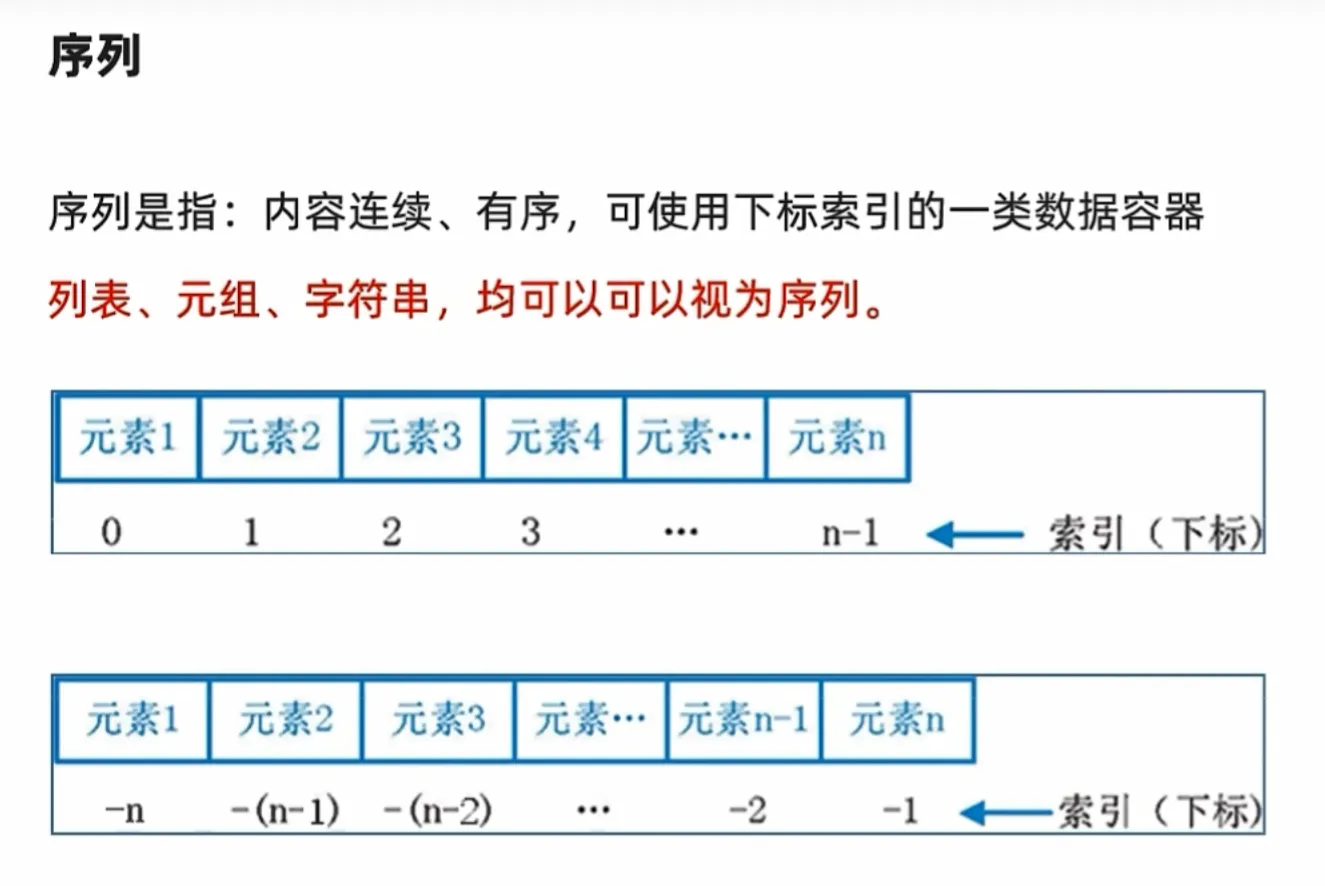
List不仅可以正向索引:从 0 到 n-1;也可以反向索引:从 -n 到 -1
List_1 = [1,2,"hello","world"] print("正向索引:") for i in range(0,len(List_1)): print(List_1[i]) print("反向索引:") for i in range(-len(List_1),0): print(List_1[i]) """ 正向索引: 1 2 hello world 反向索引: 1 2 hello world """ -
若 List 为嵌套列表,可以通过 下标复用 方式访问 被嵌套列表里的元素
List_1 = [1,2,"hello","world"]
for i in List_1:
    print(i)

List_2 = [List_1,3,4,[7,8,9]]
print(f"列表2的长度: {len(List_2)}")

for i in range(len(List_2[0])):
    print(List_2[0][i])

for i in range(len(List_2)):
    if isinstance(List_2[i],list):
        for j in range(len(List_2[i])):
            print(List_2[i][j],end=" ")
    else:
        print(List_2[i],end=" ")
"""
结果:
1
2
hello
world
列表2的长度: 4
1
2
hello
world
1 2 hello world 3 4 7 8 9
"""
列表推导式
列表推导式是一种用一行代码来创建新列表的简洁、优雅的方式
核心思想:从 for 循环到列表推导式
squares = []  # 1. 创建一个空列表
for x in range(10):  # 2. 遍历一个序列
    squares.append(x**2)  # 3. 对每个元素进行操作,并添加到新列表中

print(squares)
# 输出: [0, 1, 4, 9, 16, 25, 36, 49, 64, 81]
这个过程需要三行代码。现在,看看如何用列表推导式在一行内完成同样的事情。
使用列表推导式:
squares = [x**2 for x in range(10)]

print(squares)
# 输出: [0, 1, 4, 9, 16, 25, 36, 49, 64, 81]
它把 for 循环的三个核心部分——操作、循环——都整合到了一对方括号 [] 中。
语法结构分解
一个基本的列表推导式由三部分组成:
new_list = [expression for item in iterable]- expression:对 item 进行的操作,其结果会成为新列表的元素。在上面的例子中,就是 x**2。
- for item in iterable:一个标准的 for 循环,用于遍历源序列。在上面的例子中,就是 for x in range(10)。
- []:表示我们正在创建一个新的列表。
你可以这样理解它的执行顺序,就像读一句话一样:
“对于 源序列 中的每一个 item,执行 expression 操作,并将结果收集到一个新列表中。”
列表的操作方法-增删查改
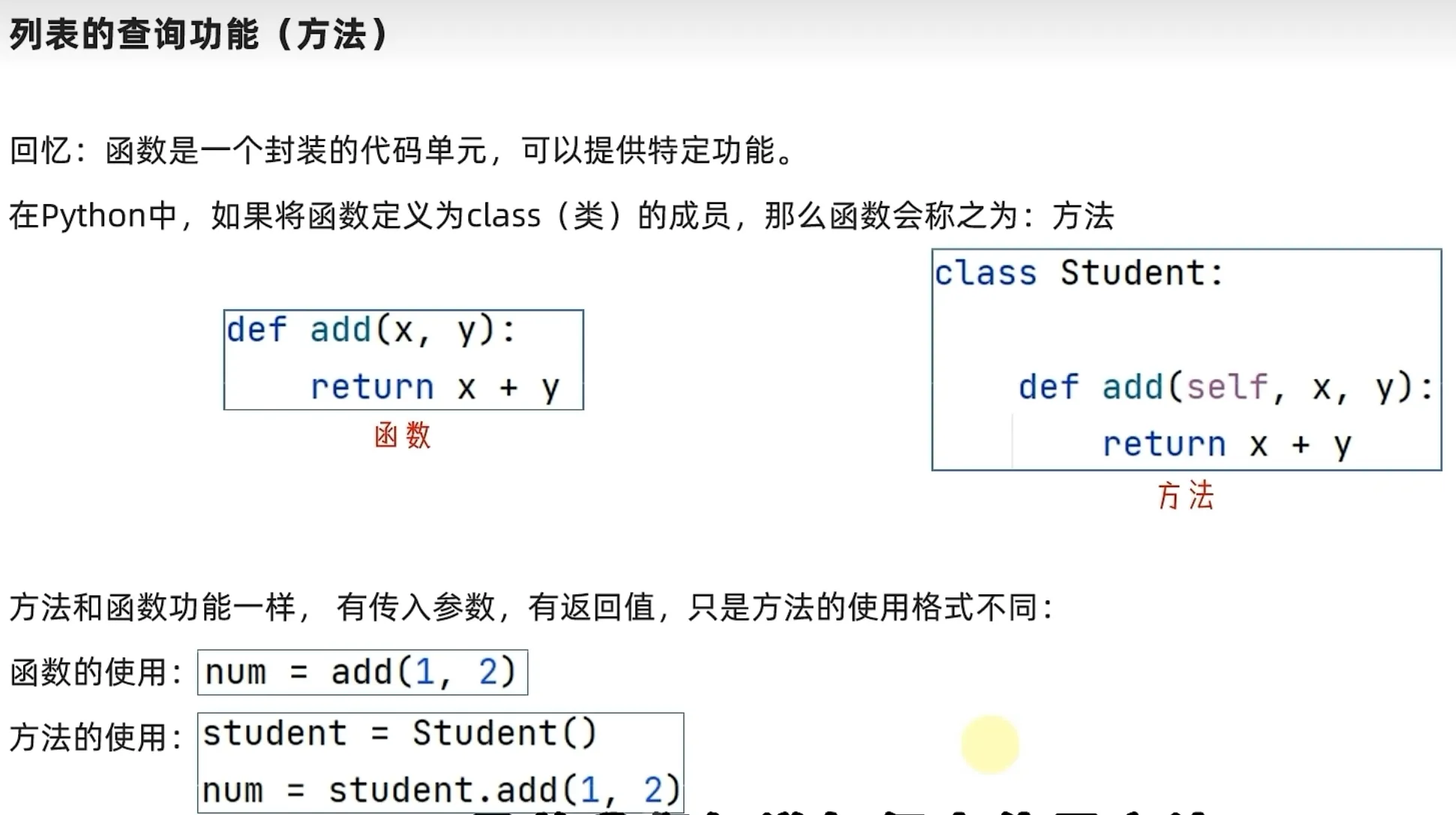
方法def-类class中的内置函数
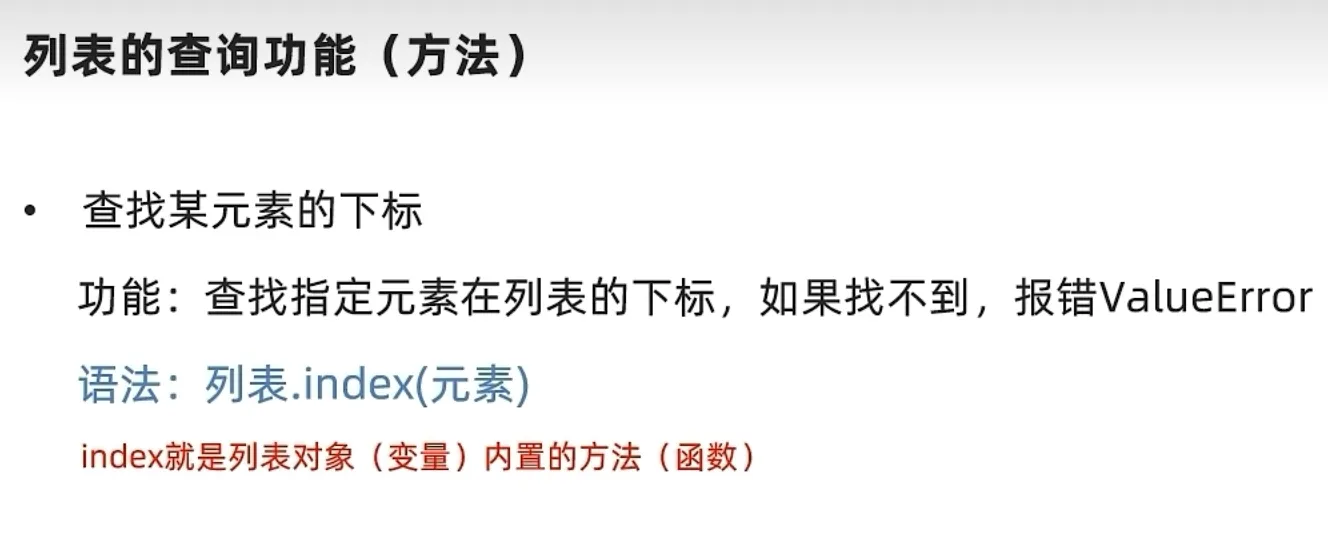
列表的查询方法-.index(value)
List_1 = [1,2,"hello","world"]
List_2 = [List_1,3,4,[7,8,9]]
val = []
# 输出指定元素值对应的下标
print(List_1.index(1))  # Output: 0
print(List_1.index("hello"))  # Output: 2

for i in range(len(List_1)):
    i = List_1.index("hello")
    val.append(i)
print(val)
# Output: [2,2,2,2]
val.clear()
for i in range(len(List_1)):
    i = List_1.index(List_1[i])
    val.append(i)
print(val)
"""
Output:
0
2
[2, 2, 2, 2]
[0, 1, 2, 3]
"""
修改元素值
修改特定索引的元素值
语法:列表[下标] = 值
list[index] = valueList_1 = [1,2,"hello","world"]
List_1[2] = "Hi"
print(List_1)
"""
output:
[1, 2, 'Hi', 'world']
"""插入元素
在指定索引位置插入元素
# 语法
list.insert(index,value)
不同于C++,若插入的索引值大于当前列表长度n时,他不会报错,只会在列表末尾插入该值,列表长度+1 ==> 容易内存泄漏
List_1 = [1,2,"hello","world"]

List_1.insert(8, "inserted_value")
print(List_1)

List_1.insert(3, "inserted_value")
print(List_1)

for i in range(3):
    List_1.insert(len(List_1)+10, i) # 注意这个 + 10
print(List_1)
"""
output:
[1, 2, 'hello', 'world', 'inserted_value']
[1, 2, 'hello', 'inserted_value', 'world', 'inserted_value']
[1, 2, 'hello', 'inserted_value', 'world', 'inserted_value', 0, 1, 2]
"""
在列表末尾追加元素
在列表末尾追加单个元素
# 语法
list.append(value)
追加其他数据容器存储的元素
# 语法
list.extend(contanier)
"""
将其他数据容器 contanier 的内容(元素)取出,依次追加到列表尾部
"""
List_1 = [1,2,"hello","world"]
List_2 = [List_1,3,4,[7,8,9]]
for i in range(len(List_2)):
if isinstance(List_2[i], list):
List_1.extend(List_2[i])
else:
List_1.append(List_2[i])
print(List_1)
"""
output:
[1, 2, 'hello', 'world', 1, 2, 'hello', 'world', 3, 4, 7, 8, 9]
"""删除元素
del list[index] —调用delete函数
list.pop(index)—使用list类内置方法
List_1 = [1,2,"hello","world"]
List_2 = [List_1,3,4,[7,8,9]]

del List_2[0][1:]
print(List_2)
List_2[3].pop(2)
print(List_2)
"""
output:
[[1], 3, 4, [7, 8, 9]]
[[1], 3, 4, [7, 8]]
"""
删除指定元素在列表中的第一个匹配项 .remove(val)
"""
删除某元素值 value 在 list 中的第一个匹配项
"""
# 语法:
list.remove(value)
List_1 = [1,2,"hello","world"]
List_2 = [List_1,3,4,[7,8,9]]
List_1.remove("hello") # Remove "hello" from List_1
print(List_1) # Output: [1, 2, 'world']
List_1.remove(2222) #ouput: ValueError: list.remove(x): x not in list清空列表内容 .clear(val)
list.clear()查询方法
统计某元素在列表中的数量 .count(val)
List_2 = [List_1,3,4,[7,8,9],3,3,3,3]

print(List_2.count(3))
"""
output:
5
"""
统计列表的元素个数 len(list)
List_2 = [List_1,3,4,[7,8,9],3,3,3,3]

print(len(List_2)) # output: 8
方法总结

列表的遍历操作-while | for
通过while循环操作
List_2 = [List_1,3,4,[7,8,9]]

index = 0
while index < len(List_2):
    print(List_2[index])
    index +=1
for 循环操作
List_2 = [List_1,3,4,[7,8,9]]

for i in range(len(List_2)):
    print(List_2[i])
元组 tuple
特点
元组同列表 list 一样,可以封装多个、不同类型的元素,但有一个很大的不同点:**元组一旦定义完成,就不可以修改!!!**就像C++里定义了一个 const Array,是 只读 的
def
元组的定义使用小括号 (),且使用逗号隔开各个数据,数据可以是不同的数据类型。
# 方式一
tuple_1 = (1,"2",3)
# 嵌入式元组
tuple_2 = (tuple_1,2,3,"4")
# 空元组
tuple_3 = ()
tuple_4 = tuple() # tuple 类
注意:当元组只有一个元素时,这个数据后面要带逗号!
元组的操作
.index()查找指定元素值的下标
.count()统计某个元素值在元组中的次数
len(tuple)计算元组长度
# 方式一
tuple_1 = (1,"2",3)
# 嵌入式元组
tuple_2 = (tuple_1,2,3,"hello")

for i in tuple_2:
    print(f"the index of {i} in tuple is:{tuple_2.index(i)}")
print(f"Tuple's length is {len(tuple_2)}")
"""
output:
the index of (1, '2', 3) in tuple is:0
the index of 2 in tuple is:1
the index of 3 in tuple is:2
the index of hello in tuple is:3
Tuple's length is 4
"""
元组嵌套其它数据结构
嵌套 List
list_1 = [1,"2",3]
# 嵌入式元组
tuple_2 = (list_1,2,3,"hello")

tuple_2[0][1]="hello"
for i in tuple_2:
    print(f"the index of {i} in tuple is:{tuple_2.index(i)}")
   """
ouput:
the index of [1, 'hello', 3] in tuple is:0
the index of 2 in tuple is:1
the index of 3 in tuple is:2
the index of hello in tuple is:3
   """
综合案例

Tp = ("周杰伦",11,['footbal','music'])

# check index
age = 11
print(f"Zhou's age is in index {Tp.index(age)} ")
# Find stu's name
idx_1 = 0
print(f"Name is {Tp[idx_1]}")
# delete "football"
del Tp[2][0]
print("hobby is",Tp[2])
# Add hobby "codding"
Tp[2].append("codding")
print("Now hobby is",Tp[2])
"""
output:
Zhou's age is in index 1
Name is 周杰伦
hobby is ['music']
Now hobby is ['music', 'codding']
"""
字符串
Def - 存放字符char的容器-同C++
下标访问字符串内容
和列表相同,有两种下标索引方式:
- 正向索引:从 0 到 n-1
- 反向索引:从 -n 到 -1
特点: 和元组一样是一个常量
和元组一样是一个常量,无法修改容器的内容。
操作语法
.index()方法查询指定元素值的下标
.replace(str1,str2)替换方法
# 语法
str_4 = str3.replace(str1,str_2)
将 str2 的内容覆盖到 str3 中的 str1(即 str1 是 str3 的一部分),同时将覆盖的字符串存储到新的字符串 str_4 中,但 str_1 的值不变!
str_1 = "hello,today is a nice day!"
str_4 = str_1.replace("hello,","Hi!")
print(f"String_1 val is still {str_1}")
print(f"But string_4's val is {str_4}")
"""
output:
String_1 val is still hello,today is a nice day!
But string_4's val is Hi!today is a nice day!
"""
.split()方法

str_1 = "hello, today is a nice day!"
print(f"String_1 val is {str_1}")
ls = str_1.split(" ") # 通过 space 进行字符切分
print(ls)
"""
output:
String_1 val is hello, today is a nice day!
['hello,', 'today', 'is', 'a', 'nice', 'day!']
"""
.strip()规整操作

但是,该语法只能去除首个匹配的字符!且相同字符只会去掉一个,要想全部去掉只能用 .replace(value),而且碰到与字符不同时就会停下匹配
-----很鸡肋,不管了
str_1 = " 12hello, today is a nice day!12 "
print(f"String_1 val is {str_1}")
print(f"Now string_1 val is {str_1.strip()}") # 注意:str_1是常量,本身值不会变!
print(f"Now string_1 val is {str_1.strip('12')}") # 无空格时连首尾的1、2都没去掉!
print(f"Now string_1 val is {str_1.strip(' 12')}") # 有空格!
"""
output:
String_1 val is  12hello, today is a nice day!12
Now string_1 val is 12hello, today is a nice day!12
Now string_1 val is  12hello, today is a nice day!12
Now string_1 val is hello, today is a nice day!
"""
.count(value) 统计某字符char在str中的出现次数
len(string) 计算长度
endswith
判断字符串以什么字符结尾
a.endswith('abcd')是否以abcd结尾,返回 True 或 False。
startswith(prefix)
startswith(prefix): 检查字符串是否以 prefix 开头,返回 True 或 False。
find(sub): 查找子字符串 sub 第一次出现的位置,如果找不到则返回 -1
index(sub): 与 find() 类似,但如果找不到子字符串会抛出 ValueError 异常。
upper(): 将所有字符转换为大写。
lower(): 将所有字符转换为小写。
title(): 将每个单词的首字母转换为大写
join
join(iterable): 使用调用该方法的字符串作为分隔符,将一个可迭代对象(如列表)中的所有元素连接成一个新的字符串。
words = ['hello', 'world', 'python']
separator = " "
sentence = separator.join(words)
print(sentence)  # 输出: hello world python

items = ['apple', 'banana', 'cherry']
csv_line = ",".join(items)
print(csv_line)  # 输出: apple,banana,cherry
操作小结

练习案例
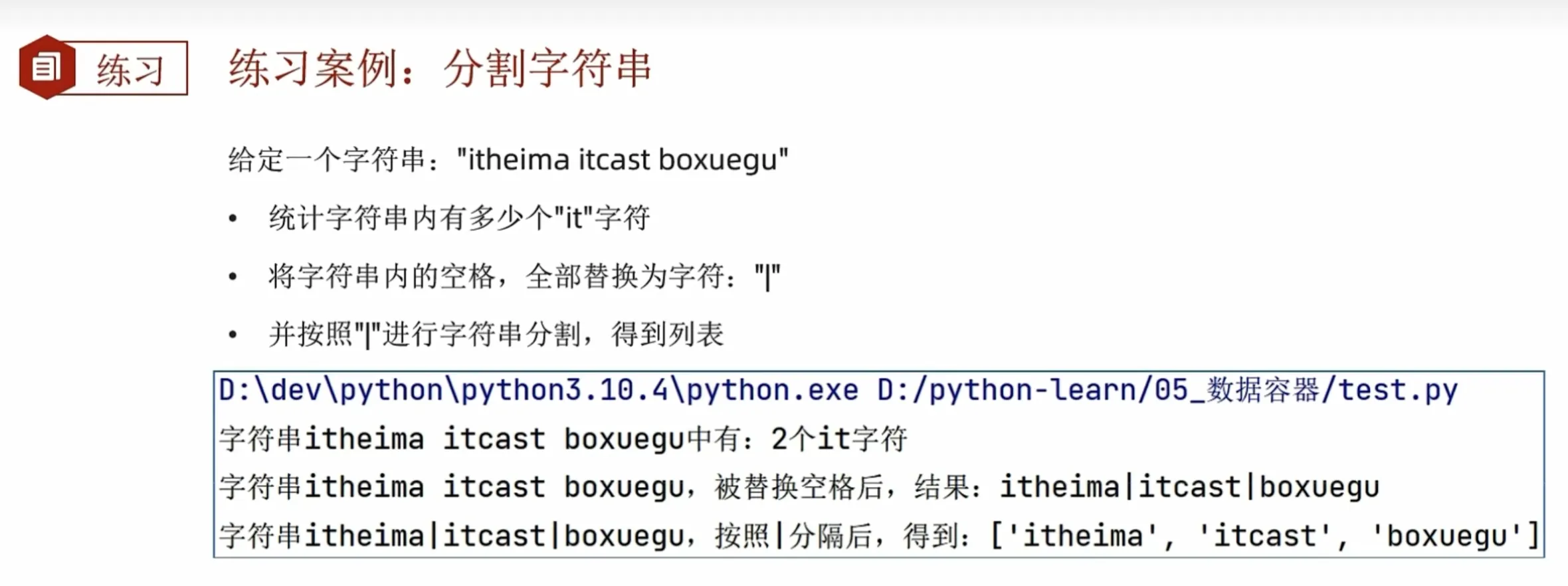
参考代码:
"""
练习案例:字符串语法
"""

str1 = "ithudahuw ithudan hwdabit"
print(f"it has {str1.count('it')} 'it'")
str2 = str1.replace(' ','|')
print(f"{str2}")
ls1 = str2.split('|')
print(f"所得列表:{ls1}")
"""
it has 3 'it'
ithudahuw|ithudan|hwdabit
所得列表:['ithudahuw', 'ithudan', 'hwdabit']
"""
序列切片
切片操作

例如
ls[0::2]# 从头到尾,步长为2只需注意:得到的是一个新序列,而不是对原序列做了操作
-
ls[::]#表示遍历整个序列,且步长为 1 -
如果为
ls[::-1] #表示遍历整个序列,并且是从尾到头,逆序遍历
案例
"""
练习案例:序列的切片---拿到"小小怪下士"这个字符串
"""
# python string_grammer.py
s = "来过带他把,哪在士下怪小小,怪大大是我"
print(s)
ss = s[::-1]
print(ss)
i1 = ss.index("小")
i2 = ss.index("士")
# 通过索引获取元素后,再提取前5个字符
res = ss[i1:i2 + 1:]
print(res)
集合Set
特性
- 不支持重复元素(元素唯一)-----核心
- 内部元素无序
语法
-
列表
ls = [a,v,b] -
元组
tu = (1,2,"dd") -
字符串
str = "adhsud" -
集合(set)
# 1.
set() # 空集合
a = set()
# 2.
set0 = {1,2,"11"}
set = {12}
print(set0)
print(set)
# {1, 2, '11'}
# {12}
常用操作
注意事项
因为集合是无序的,所以集合不支持下标索引访问集合内部元素
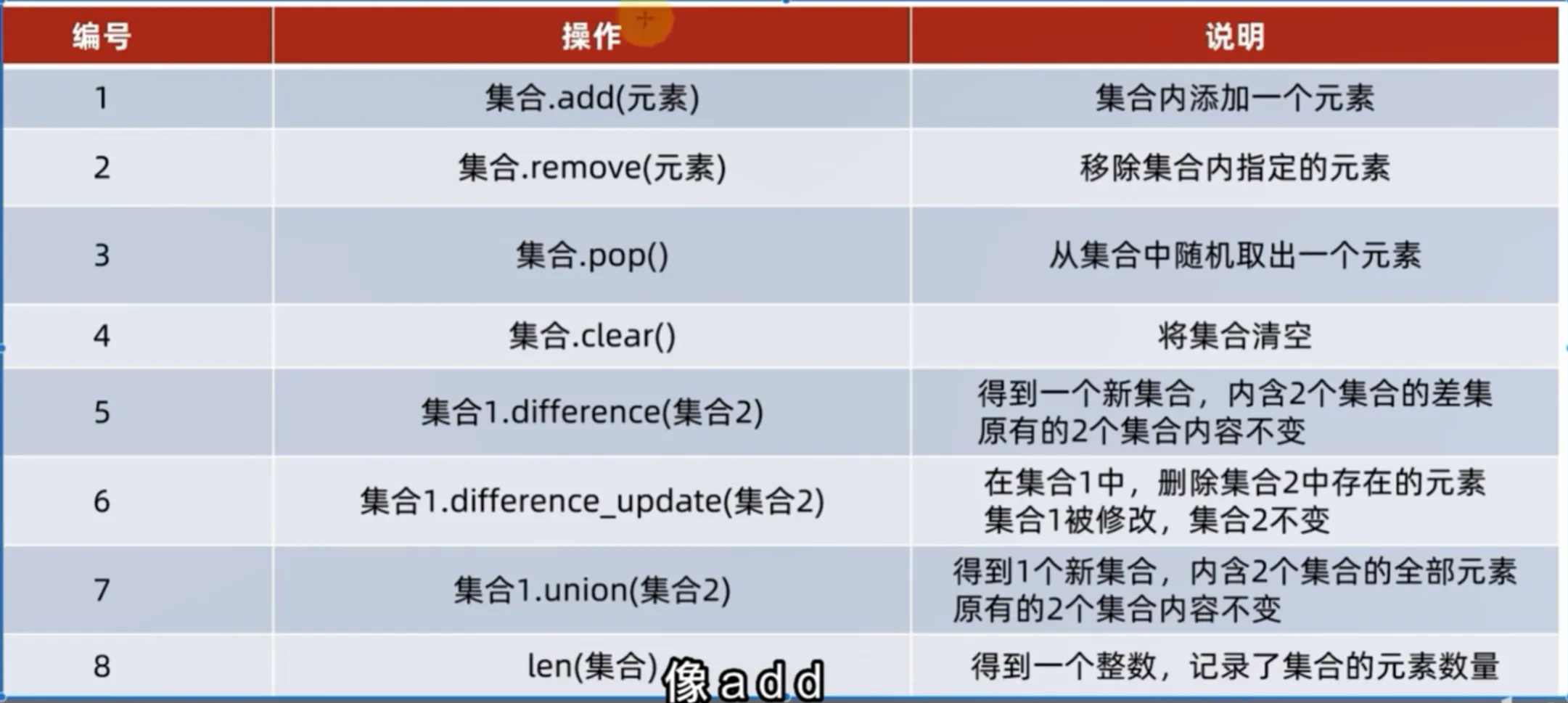
添加元素
-
语法:
a = set() a.add(value) -
结果:
集合本身被修改
a = set()
set0 = {1,2,"11"}
a.add("1")
print(set0)
print(a)
# {1, 2, '11'}
# {'1'}
移除元素
-
语法:
set0 = {1,2,"11"}
set0.remove(1)
print(set0)
# {2, '11'}
集合本身被修改
从集合中随机取出元素
-
语法
set0 = {1,2,"11"} o = set0.pop() ---此处 print(set0) print(o) # {2, '11'} # 1 -
结果
得到一个元素的结果。同时集合本身被修改
清空集合
-
语法:
set.clear()
取出两个集合的差集
-
语法
集合1.difference(集合2),取出集合一与集合二的差集:集合一有的而集合二没有
set0 = {1,2,"11",3,4,5,6,7} set1 = {1,2,8,9,"22"} set2 = set0.difference(set1) print(set2) # {3, 4, 5, 6, 7, '11'} -
结果
- 得到一个新集合
- 集合一和集合二不变
消除两个集合的差集
-
语法
集合1.difference_update(集合2)
-
功能
比较集合1和集合2,删除集合1中与集合二相同的元素。
-
结果
集合1被修改,集合2不变
set0 = {1,2,"11",3,4,5,6,7}
set1 = {1,2,8,9,"22"}
set0.difference_update(set1)
print(set0)
# {3, 4, 5, 6, 7, '11'}
两个集合合并
-
语法
set1.union(set2) -
功能
将集合1和集合2组成新的集合
-
结果
得到一个新集合set3,但是集合1和集合2不变
set0 = {1,2,"11",3,4,5,6,7}
set1 = {1,2,8,9,"22"}
set2 = set0.union(set1)
print(set2)
# {1, 2, 3, 4, 5, 6, 7, 8, 9, '11', '22'}
操作总结
小测试
"""
去重:
ls = ['a','a','a',1,1,1,2,2,3,4,5,6,6,6,7,7,8,'b','c']
"""
ls = ['a','a','a',1,1,1,2,2,3,4,5,6,6,6,7,7,8,'b','c']
a = set()
for i in ls:
    a.add(i)
print(a)
# {1, 2, 3, 4, 5, 6, 7, 8, 'b', 'c', 'a'}
字典
字典的定义
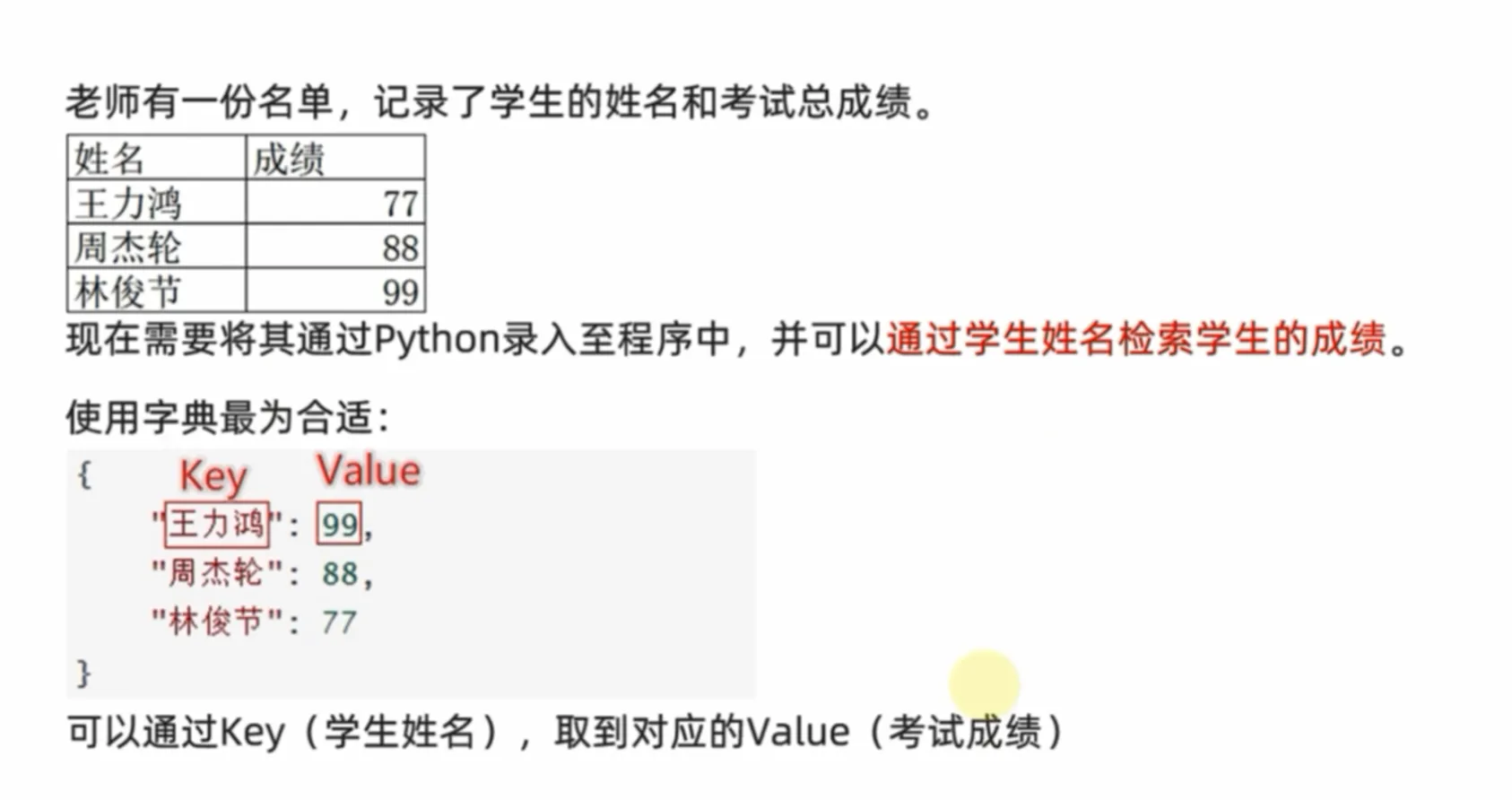
字典是 Python 中的一种可变、无序的数据结构,用于存储一系列的键-值对。
- 键 (Key): 必须是唯一且不可变的类型,例如字符串、数字(整数或浮点数)、元组 (tuple)。列表或字典本身不能作为键,因为它们是可变的。键用于索引和查找对应的值。
- 值 (Value): 可以是任意类型的 Python 对象,例如数字、字符串、列表、元组,甚至另一个字典。值可以重复。
- 键-值对: 每个键与其对应的值构成一个键-值对,它们是字典中存储的基本单元。
你可以把字典想象成一本真正的字典或电话簿:
- 键 就像是你要查的单词或人名。
- 值 就像是这个单词的解释或这个人的电话号码。
例如:
语法
# 空字典定义
a = {}
b = dict()
# 定义字典变量
person = {
    "name":"Jay",
    "age" : 18,
    "city":"Beijing"
}
# 使用dict()和键值对的元组列表定义
dog = dict([('name','Bob'),("age",2)])
cat = dict(name="CJ",age = 10)
print(person)
print(dog)
print(cat)
"""
{'name': 'Jay', 'age': 18, 'city': 'Beijing'}
{'name': 'Bob', 'age': 2}
{'name': 'CJ', 'age': 10}
"""
dict() 函数介绍
dict() 是 Python 的一个内置构造函数,用于创建字典对象。
字典值value的获取
字典同集合一样,不能通过下标索引获取元素值。
-
使用键索引
[]:可以通过键值Key获得对应的元素值 --------就像你查字典一样
person = { "name":"Jay", "age" : 18, "city":"Beijing" } # 使用dict()和键值对的元组列表定义 dog = dict((('name','Bob'),("age",2))) cat = dict(name="CJ",age = 10) print(person['name']) # Jay -
使用 .get() 方法: 这是更安全的方式,如果键不存在,它会返回 None 或你指定的默认值,而不是报错。
person = {"name": "Alice", "age": 25}
print(person.get("name"))      # 输出: Alice
print(person.get("country"))   # 输出: None
print(person.get("country", "Unknown")) # 输出: Unknown (指定默认值)
字典嵌套
字典的 key 和 value 可以是任意的数据类型,除了 key 不能为字典。
那么,这就意味着字典可以嵌套
有一需求:记录每个学生的各科的考试成绩
| 姓名 | 语文 | 数学 | 英语 |
|---|---|---|---|
| 王 | 77 | 66 | 88 |
| 周 | 44 | 55 | 99 |
| 林 | 11 | 22 | 33 |
分析:
姓名作为 key,成绩作为 value。 value 可看为一个字典:key 是科目名字,value是分数
因此数据结构为:
score-table = {
	"姓名":{
        "语文":"score-1",
        "数学":"score-2",
        "英语":"score-3"
    }
}
score_table = {
	"王":{
        "语文":77,
        "数学":66,
        "英语":88
    },
    "周":{
        "语文":44,
        "数学":55,
        "英语":99
    },
    "林":{
        "语文":11,
        "数学":22,
        "英语":33
    }
}
print(f"王的成绩{score_table['王']}")
print(f"周的成绩{score_table['周']}")
print(f"林的成绩{score_table['林']}")
print(f"王的语文成绩:{score_table['王']['语文']}")
"""
王的成绩{'语文': 77, '数学': 66, '英语': 88}
周的成绩{'语文': 44, '数学': 55, '英语': 99}
林的成绩{'语文': 11, '数学': 22, '英语': 33}
王的语文成绩:77
"""
操作
修改现有元素的值
字典[key] = value
person = {"name": "Alice", "age": 25}
person["age"] = 26  # 修改 age 的值
print(person)  # 输出: {'name': 'Alice', 'age': 26}
添加新的键-值对
-
字典[key] = value
字典的 key 不可以重复,否则就是对已有的 key 进行修改
person = {"name": "Alice", "age": 25} person["city"] = "New York" # 添加新的键值对 print(person) # 输出: {'name': 'Alice', 'age': 25, 'city': 'New York'} -
.update()方法
sample = {
        "a":1,
        "b":2,
        "c":3
        }
print(sample)
sample["a"] = 11
sample["d"] = 4
sample.update([("e",5),("f",6)])
print(sample)
# {'a': 1, 'b': 2, 'c': 3}
# {'a': 11, 'b': 2, 'c': 3, 'd': 4, 'e': 5, 'f': 6}
删除元素
-
del关键字sample = { "a":1, "b":2, "c":3 } print(sample) sample["a"] = 11 sample["d"] = 4 sample.update([("e",5),("f",6)]) print(sample) del sample["e"] print(sample) """ {'a': 1, 'b': 2, 'c': 3} {'a': 11, 'b': 2, 'c': 3, 'd': 4, 'e': 5, 'f': 6} {'a': 11, 'b': 2, 'c': 3, 'd': 4, 'f': 6} """ -
**.pop()**方法
结果:删除指定键的元素,并返回该键对应的值。
sample = { "a":1, "b":2, "c":3 } print(sample) sample["a"] = 11 sample["d"] = 4 sample.update([("e",5),("f",6)]) print(sample) sample.pop("e") print(sample) """ {'a': 1, 'b': 2, 'c': 3} {'a': 11, 'b': 2, 'c': 3, 'd': 4, 'e': 5, 'f': 6} {'a': 11, 'b': 2, 'c': 3, 'd': 4, 'f': 6} """ -
**.clear()**方法
结果:清空字典
sample = {
        "a":1,
        "b":2,
        "c":3
        }
print(sample)
sample["a"] = 11
sample["d"] = 4
sample.update([("e",5),("f",6)])
print(sample)

sample.clear()
print(sample)
"""
{'a': 1, 'b': 2, 'c': 3}
{'a': 11, 'b': 2, 'c': 3, 'd': 4, 'e': 5, 'f': 6}
{}
"""
获取全部的key
语法:字典.keys()
结果:得到字典中所有的key
sample = {
        "a":1,
        "b":2,
        "c":3
        }
sample["a"] = 11
sample["d"] = 4
sample.update([("e",5),("f",6)])

keys = sample.keys()
print(keys)
"""
dict_keys(['a', 'b', 'c', 'd', 'e', 'f'])
"""
字典的遍历
-
遍历 key
使用 for 循环遍历 key 或者使用方法 .keys()获得所有 key,二者效果相同
person = {"name": "Alice", "age": 25, "city": "New York"} for key in person: # 直接遍历字典默认是遍历键 print(key) """ 或者 """ for key in person.keys() print(key) -
遍历 value
person = {"name": "Alice", "age": 25, "city": "New York"} for val in person.values(): # 直接遍历字典默认是遍历键 print(val) -
遍历 键-值 对(最常用)
for key, value in person.items():
    print(f"Key: {key}, Value: {value}")
# 输出:
# Key: name, Value: Alice
# Key: age, Value: 25
# Key: city, Value: New York
sample = { "a":1, "b":2, "c":3 } sample["a"] = 11 sample["d"] = 4 sample.update([("e",5),("f",6)]) keys = sample.items() print(keys) """ dict_items([('a', 11), ('b', 2), ('c', 3), ('d', 4), ('e', 5), ('f', 6)]) """
获取字典中键-值对的数量
len(my_dict): 获取字典中键-值对的数量。
person = {"name": "Alice", "age": 25}
print(len(person)) # 输出: 2
检查一个键是否存在于字典中
key in my_dict: 检查一个键是否存在于字典中。
返回 True或者False
只检查键,不检查值
person = {"name": "Alice", "age": 25}
print("name" in person)  # 输出: True
print("country" in person) # 输出: False
print("Alice" in person) # 输出: False (只检查键,不检查值)
字典特点

小练习

employee_salaries = {
    "王":{
        '部门':"科技部",
        '工资':3000,
        '级别':1
    },
    "周":{
        '部门':"市场部",
        '工资':3000,
        '级别':2
    },
    "林":{
        '部门':"市场部",
        '工资':7000,
        '级别':3
    },
    "张":{
        '部门':"科技部",
        '工资':4000,
        '级别':1
    },
    "刘":{
        '部门':"市场部",
        '工资':6000,
        '级别':3
    }
}
print(f"输出前:{employee_salaries}")
for i in employee_salaries:
    for j,k in employee_salaries[i].items():
        if j == '级别' and k == 1:
            employee_salaries[i]['工资'] += 1000
            employee_salaries[i]['级别'] += 1
print(f"结果:{employee_salaries}")
核心区别总结表
| 特性 (Feature) | 列表 (List) | 元组 (Tuple) | 字符串 (String) | 集合 (Set) | 字典 (Dictionary) |
|---|---|---|---|---|---|
| **可变性 ** | **可变 ** | 不可变 | **不可变 ** | **可变 ** | **可变 ** |
| **有序性 ** | **有序 ** | **有序 ** | **有序 ** | 无序 | **有序 ** |
| **元素唯一性 ** | 允许重复元素 | 允许重复元素 | 允许重复字符 | 元素必须唯一 | 键 (Key) 必须唯一 |
| **语法 ** | [ ] | ( ) | ” ” 或 ’ ’ | { } (非空) / set() (空) | {key: value} |
| **访问方式 ** | 通过索引 [i] | 通过索引 [i] | 通过索引 [i] | 不支持索引 | 通过键 [key] |

1. 列表 (List)
列表是 Python 中最常用、最灵活的数据结构。
-
特点:
- 可变: 创建后可以随意添加、删除或修改其中的元素。
- 有序: 元素存储的顺序就是你放入的顺序,可以通过索引访问。
- 允许重复: 可以包含任意多个相同的元素。
-
语法: 使用方括号 [] 定义,元素之间用逗号 , 分隔。
# 创建一个列表 my_list = [1, "apple", 3.14, "apple"] empty_list = [] -
常见操作:
my_list.append("orange") # 在末尾添加元素 -> [1, "apple", 3.14, "apple", "orange"] my_list[0] = "one" # 修改元素 -> ["one", "apple", 3.14, "apple", "orange"] my_list.remove("apple") # 删除第一个匹配的元素 -> ["one", 3.14, "apple", "orange"] print(my_list[1]) # 通过索引访问 -> 3.14 -
主要应用场景:
- 当你需要一个会动态变化的元素集合时,例如:存储用户的待办事项、文章的评论列表、一个班级的学生名单等。
- 是 Python 中最通用的序列容器。
2. 元组 (Tuple)
元组可以看作是“不可变”的列表。
-
特点:
- 不可变: 一旦创建,就不能修改、添加或删除其中的元素。
- 有序 : 和列表一样,元素是有顺序的,可以通过索引访问。
- 允许重复: 同样可以包含重复的元素。
-
语法: 使用圆括号 () 定义,元素之间用逗号 , 分隔。
# 创建一个元组 my_tuple = (1, "apple", 3.14, "apple") empty_tuple = () # 注意:只有一个元素的元组需要加一个逗号 single_tuple = (1,) -
常见操作:
print(my_tuple[1]) # 通过索引访问 -> "apple" # 下面的操作会报错 TypeError # my_tuple[0] = "one" # my_tuple.append("orange") -
主要应用场景:
- 当你希望数据是“只读”的,不应被意外修改时。例如:函数返回多个值、坐标点 (x, y)、数据库记录。
- 因为其不可变性,元组可以作为字典的键,而列表不能。
- 通常比列表的内存占用稍小,处理速度稍快。
3. 字符串 (String)
字符串是专门用来表示文本的序列。
-
特点:
- 不可变: 和元组一样,字符串一旦创建就不能被修改。任何对字符串的修改操作(如替换、拼接)都会返回一个新的字符串。
- 有序 : 字符串中的每个字符都有固定的顺序,可以通过索引访问。
- 允许重复: 可以包含重复的字符,例如 “hello”。
-
语法: 使用单引号 ’ ’ 或双引号 ” ” 定义。
my_str = "Hello, World!" -
常见操作:
print(my_str[0]) # 访问单个字符 -> 'H' print(my_str[7:12]) # 切片操作 -> 'World' new_str = my_str.replace("World", "Python") # 返回新字符串 -> "Hello, Python!" # 下面的操作会报错 TypeError # my_str[0] = 'J' -
主要应用场景:
- 处理任何文本信息,如用户名、文件内容、消息等。
4. 集合 (Set)
集合是一个不包含重复元素的无序集合。
-
特点:
- 可变: 可以添加或删除元素。
- 无序 : 元素没有固定的顺序,因此不支持索引访问。
- 元素唯一: 集合会自动去除所有重复的元素。
-
语法: 使用花括号 {} 定义,或者使用 set() 函数。
# 创建一个集合 my_set = {1, "apple", 3.14, "apple"} # "apple" 只会出现一次 print(my_set) # 输出可能是 {1, 3.14, 'apple'},顺序不保证 # 创建一个空集合必须用 set() empty_set = set() # 注意:{} 创建的是空字典 -
常见操作:
my_set.add("orange") # 添加元素 my_set.remove(1) # 删除元素 print("apple" in my_set) # 检查成员是否存在 (非常快) -> True # 数学运算 set1 = {1, 2, 3} set2 = {3, 4, 5} print(set1 | set2) # 并集 -> {1, 2, 3, 4, 5} print(set1 & set2) # 交集 -> {3} -
主要应用场景:
- 去重: 将一个列表转换为集合可以快速去除所有重复项。
- 关系测试: 快速判断一个元素是否存在于一个集合中。
- 进行数学上的集合运算(并集、交集、差集等)。
5. 字典 (Dictionary)
字典是一种以**“键-值”(key-value)对**形式存储数据的集合。
-
特点:
- 可变 可以添加、删除或修改键值对。
- **有序 ** 从 Python 3.7 开始,字典会保持键值对的插入顺序。在更早的版本中是无序的。
- 键唯一 字典中的键必须是唯一的且不可变的(如字符串、数字、元组),值则可以重复。
-
语法: 使用花括号 {} 定义,每个元素是 key: value 的形式。
# 创建一个字典 my_dict = { "name": "Alice", "age": 30, "city": "New York" } empty_dict = {} -
常见操作:
print(my_dict["name"]) # 通过键访问值 -> "Alice" my_dict["age"] = 31 # 修改值 my_dict["email"] = "alice@example.com" # 添加新的键值对 del my_dict["city"] # 删除键值对 print(my_dict.keys()) # 获取所有键 print(my_dict.values()) # 获取所有值 -
主要应用场景:
- 当你需要将数据与标签(键)关联起来时。例如:存储一个用户的个人信息、表示一个 JSON 对象、存储配置参数等。
- 提供了非常快速的基于键的查找。
生动的比喻
- 列表 (List): 像一张购物清单,你可以随时在上面添加、划掉或修改商品,而且商品的顺序就是你写下的顺序。
- 元组 (Tuple): 像一份已签署的合同,内容是固定的,不能再做任何修改。
- 字符串 (String): 就像书本里的一句话,你可以读它,但不能直接在书上用橡皮擦掉一个字来修改它。
- 集合 (Set): 像一个装满独特弹珠的袋子,你只关心里面有哪些种类的弹珠,不关心它们的顺序,而且每种弹珠只有一个。
- 字典 (Dictionary): 就像一本真正的字典,你可以通过“单词”(键)快速查到它的“释义”(值)。
数据容器的通用操作
一个对象是“可迭代的”,意味着它可以被逐一遍历其中的元素。这是所有通用操作的基础。
列表、元组、字符串、集合、字典都是可迭代对象。
遍历
遍历
使用 for 循环是遍历所有这些容器最通用的方法。
-
列表 (list): 遍历每个元素
my_list = [1, 'a', True] for item in my_list: print(item) -
元组 (tuple): 遍历每个元素
my_tuple = (1, 'a', True) for item in my_tuple: print(item) -
字符串 (str): 遍历每个字符
my_string = "hello" for char in my_string: print(char) -
集合 (set): 遍历每个元素(注意:集合是无序的,遍历的顺序不固定)
my_set = {1, 'a', True} for element in my_set: print(element) -
字典 (dict): 遍历方式有多种,最常见的是遍历键、值或键值对。
my_dict = {'name': 'Alice', 'age': 25}

# 默认遍历键 (keys)
for key in my_dict:
    print(key)  # 输出 'name', 'age'

# 明确遍历值 (values)
for value in my_dict.values():
    print(value) # 输出 'Alice', 25

# 遍历键值对 (items),最常用!
for key, value in my_dict.items():
    print(f"{key}: {value}") # 输出 'name: Alice', 'age: 25'
成员资格测试 (in 和 not in)
检查一个元素是否存在于容器中
-
列表/元组/集合: 检查元素是否存在。
my_list = [1, 2, 3] print(2 in my_list) # True -
字符串: 检查一个子字符串是否存在
my_string = "hello world" print("world" in my_string) # True print("z" in my_string) # False -
字典: 默认只检查键 (key) 是否存在。
my_dict = {'name': 'Alice', 'age': 25}
print('age' in my_dict)      # True
print('Alice' in my_dict)    # False (因为 'Alice' 是值,不是键)

# 如果想检查值是否存在,需要使用 .values()
print('Alice' in my_dict.values()) # True
通用统计功能
长度/元素个数统计 (len())
获取容器中元素的数量。
-
列表/元组/集合: 返回元素的个数。
my_list = [1, 2, 3] print(len(my_list)) # 3 -
字符串: 返回字符的个数。
my_string = "hello" print(len(my_string)) # 5 -
字典: 返回键值对的个数。
my_dict = {'name': 'Alice', 'age': 25}
print(len(my_dict)) # 2
其他统计函数 (max(), min(), sum())
-
列表/元组/集合:
nums = [1, 5, 2, 9] print(max(nums)) # 9 print(min(nums)) # 1 print(sum(nums)) # 17 -
字符串: max() 和 min() 根据字符的编码顺序(如ASCII或Unicode)返回值。sum() 不能用于字符串。
my_string = "python" print(max(my_string)) # 'y' print(min(my_string)) # 'h' # sum(my_string) # 会报错 TypeError -
字典: 默认对键 (keys) 进行操作。
my_dict = {1: 'a', 5: 'b', 2: 'c'}
print(max(my_dict)) # 5 (比较键 1, 5, 2)
print(sum(my_dict)) # 8 (对键求和 1+5+2)

# 如果要对值进行操作,需要明确指出
my_dict_str_keys = {'one': 1, 'five': 5, 'two': 2}
print(max(my_dict_str_keys.values())) # 5 (比较值 1, 5, 2)
print(sum(my_dict_str_keys.values())) # 8 (对值求和 1+5+2)
通用类型转换语法
可以使用容器类型的内置函数(如 list(), tuple(), set() 等)在这些可迭代对象之间进行转换。
1. 转换为列表 (list())
# 从元组
my_tuple = (1, 2, 3)
print(list(my_tuple))   # [1, 2, 3]

# 从字符串
my_string = "abc"
print(list(my_string))  # ['a', 'b', 'c']

# 从集合
my_set = {1, 2, 3}
print(list(my_set))     # [1, 2, 3] (顺序不保证)

# 从字典 (只转换键)
my_dict = {'a': 1, 'b': 2}
print(list(my_dict))    # ['a', 'b']
2. 转换为元组 (tuple())
# 从列表
my_list = [1, 2, 3]
print(tuple(my_list))   # (1, 2, 3)

# 从字符串
my_string = "abc"
print(tuple(my_string)) # ('a', 'b', 'c')

# 从集合
my_set = {1, 2, 3}
print(tuple(my_set))    # (1, 2, 3) (顺序不保证)

# 从字典 (只转换键)
my_dict = {'a': 1, 'b': 2}
print(tuple(my_dict))   # ('a', 'b')
3. 转换为集合 (set())
注意: 转换为集合会自动去除重复元素,并且结果是无序的。
# 从列表 (去重)
my_list = [1, 2, 2, 3, 1]
print(set(my_list))     # {1, 2, 3}

# 从元组 (去重)
my_tuple = ('a', 'b', 'a')
print(set(my_tuple))    # {'a', 'b'}

# 从字符串 (去重)
my_string = "hello"
print(set(my_string))   # {'h', 'e', 'l', 'o'}

# 从字典 (只转换键)
my_dict = {'a': 1, 'b': 2}
print(set(my_dict))     # {'a', 'b'}
4. 转换为字符串 (str())
str() 会将整个容器对象转换为其字符串表示形式,而不是遍历元素。
my_list = [1, 2, 3]
print(str(my_list))     # "[1, 2, 3]"

my_tuple = (1, 2, 3)
print(str(my_tuple))    # "(1, 2, 3)"

my_set = {1, 2, 3}
print(str(my_set))      # "{1, 2, 3}"

my_dict = {'a': 1}
print(str(my_dict))     # "{'a': 1}"
5. 转换为字典 (dict())
转换为字典的要求比较特殊,输入的可迭代对象必须是“键值对”的形式,例如一个包含元组(每个元组有两个元素)的列表。
# 从一个包含(键, 值)元组的列表
kv_list = [('name', 'Alice'), ('age', 25)]
print(dict(kv_list))    # {'name': 'Alice', 'age': 25}

# 从一个包含(键, 值)元组的元组
kv_tuple = (('a', 1), ('b', 2))
print(dict(kv_tuple))   # {'a': 1, 'b': 2}

# 注意:你不能直接转换一个简单的列表、元组或集合,因为它们没有提供键值对信息
# dict([1, 2, 3]) # 会报错 ValueError
总结表格
| 操作/转换 | 列表 list | 元组 tuple | 字符串 str | 集合 set | 字典 dict |
|---|---|---|---|---|---|
| for item in x | 遍历元素 | 遍历元素 | 遍历字符 | 遍历元素(无序) | 遍历键 |
| item in x | 检查元素 | 检查元素 | 检查子串 | 检查元素 | 检查键 |
| len(x) | 元素数量 | 元素数量 | 字符数量 | 元素数量 | 键值对数量 |
| max(x), min(x) | 按元素值 | 按元素值 | 按字符编码 | 按元素值 | 按键 |
| sum(x) | 元素求和 | 元素求和 | 不支持 | 元素求和 | 对键求和 |
| list(x) | (返回副本) | ✅ | ✅ | ✅ | ✅ (只含键) |
| tuple(x) | ✅ | (返回副本) | ✅ | ✅ | ✅ (只含键) |
| set(x) | ✅ (去重) | ✅ (去重) | ✅ (去重) | (返回副本) | ✅ (只含键,去重) |
| dict(x) | 需键值对 | 需键值对 | 不支持 | 需键值对 | (返回副本) |